
File Gone? These Recovery Tools Are Actual Lifesavers
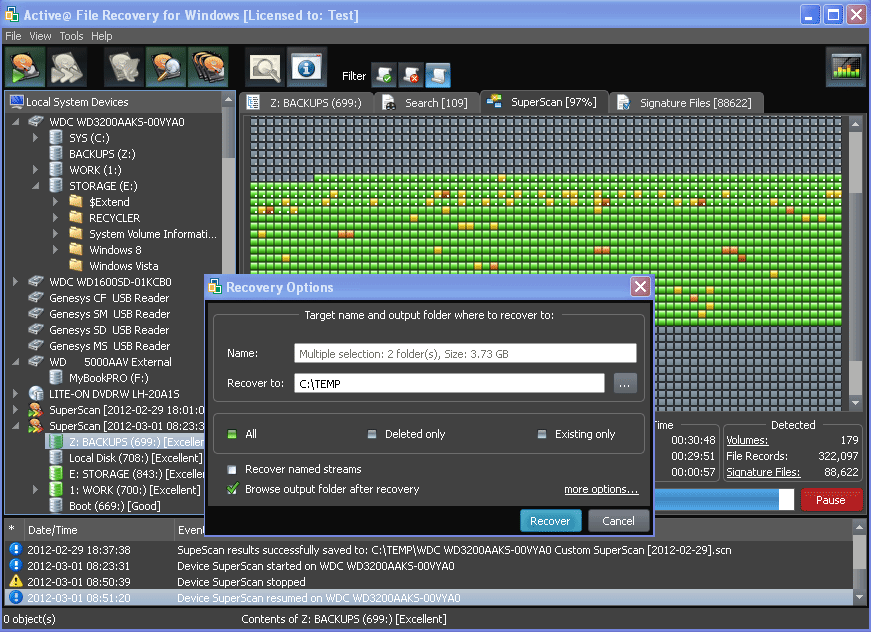
We’ve all been there, that gut-wrenching moment when you realize an important file is gone. Maybe it was an accidental deletion, a formatting mishap, a system crash, or a malware attack. Regardless of how it happened, losing valuable documents, family photos, work files, or school projects is incredibly frustrating. But don’t panic, not all hope is lost in the digital world. Thanks to powerful data recovery tools, there’s a good chance you can get your files back.
In this article, we’ll explore why files go missing, how file recovery works, and introduce you to some of the best file recovery software, including a highly recommended tool called WinfrGUI. Whether you’re a casual user or a professional, these tools can be real lifesavers.
Why Do Files Disappear?
Before diving into solutions, it’s useful to understand why files go missing in the first place. Common causes include
- Accidental Deletion: Clicking the wrong button or emptying the Recycle Bin too soon.
- Disk Formatting: Formatting a drive without backing up data.
- System Crashes: Blue screens, unexpected shutdowns, or failed OS updates.
- Malware/Ransomware Attacks: Malicious software that deletes or encrypts your files.
- Partition Loss: Corrupted or deleted disk partitions.
- File System Errors: Damage to the file system can render files invisible or inaccessible.
Luckily, when a file is deleted, it usually isn’t erased immediately. The space it occupies is marked as available for new data, but the original file can still be recovered — unless it’s been overwritten. That’s where file recovery tools come in.
How File Recovery Software Works
File recovery software scans your storage devices hard drives, SSDs, USB drives, and memory cards for lost, deleted, or inaccessible files. These tools look for file headers, system records, and fragments of data that are still present on the disk.
There are typically two scanning modes:
- Quick Scan: Fast scans for recently deleted files.
- Deep Scan: Slower but more thorough, ideal for formatted or corrupted drives.
Once the files are located, the software allows you to preview them (in most cases) and recover them to a safe location.
Best File Recovery Software in 2025
With so many recovery tools out there, it can be tough to pick the right one. Here’s a roundup of some of the best file recovery software available right now:
1. WinfrGUI
WinfrGUI is a standout option for Windows users looking for a free, reliable, and easy-to-use file recovery tool. It’s essentially a graphical user interface (GUI) for the native Windows File Recovery tool — a command-line utility provided by Microsoft.
While Windows File Recovery is powerful, its text-based interface is intimidating for most users. That’s where WinfrGUI makes a huge difference. It transforms the command-line recovery process into a simple, point-and-click experience, making it accessible to anyone.
Key Features:
- Free to use.
- Supports recovering photos, videos, documents, archives, and more.
- Recovers from NTFS, FAT, exFAT, and ReFS file systems.
- Deep scan mode for thoroughly searching formatted or corrupted drives.
- User-friendly interface with clear navigation.
Why It’s a Lifesaver:
If you’ve accidentally deleted files or formatted your drive, WinfrGUI lets you recover your data in just a few clicks, no technical skills required.
2. Recuva
Developed by Piriform, Recuva is another popular free file recovery program known for its simplicity and effectiveness. It can recover files from hard drives, memory cards, external drives, and more.
Key Features:
- Quick and deep scan options.
- Supports a wide range of file formats.
- Can recover emails and media files.
- Securely deletes files you want gone for good.
Why It’s a Lifesaver:
Recuva’s ease of use and proven track record make it an excellent go-to tool for everyday recovery tasks.
3. EaseUS Data Recovery Wizard
One of the most well-rounded tools on the market, EaseUS combines an intuitive interface with powerful recovery capabilities.
Key Features:
- Recovers files lost to accidental deletion, formatting, and crashes.
- Supports over 1000 file types.
- Previews recoverable files.
- Deep scan mode for thorough recovery.
- Available for both Windows and Mac.
Why It’s a Lifesaver:
EaseUS is particularly effective for complex recovery cases, including RAW partitions and severely damaged drives.
4. Disk Drill
Disk Drill is a powerful recovery solution for both Windows and macOS, known for its clean interface and effective scanning algorithms.
Key Features:
- Recovers up to 500MB of data free (Windows only).
- Supports a wide variety of file systems.
- Offers additional disk tools for health monitoring and data protection.
- Recovers lost partitions and formatted drives.
Why It’s a Lifesaver:
Disk Drill excels at deep scanning and recovering files from failed drives or corrupted storage devices.
5. R-Studio
A more advanced, professional-grade tool, R-Studio is designed for data recovery specialists and IT professionals.
Key Features:
- Supports virtually every file system.
- Recovers from local and network drives.
- Disk imaging and cloning.
- RAID recovery support.
- Extensive scan customization.
Why It’s a Lifesaver:
If you’re dealing with large, complex, or business-critical recovery situations, R-Studio’s advanced features can help salvage data from nearly any disaster.
When Should You Use a File Recovery Tool?
If you’ve lost files and need to recover them, act quickly. Here are some situations where these tools are most effective:
- Accidentally deleted files from your Recycle Bin.
- Formatted a disk or drive by mistake.
- Lost data due to virus/malware attacks.
- Experienced system crashes leading to lost files.
- Encountered file system corruption, making files inaccessible.
Remember: the sooner you try to recover files, the better the chances of success. Avoid writing new data to the affected disk to prevent overwriting the lost files.
Why WinfrGUI Deserves a Spot in Your Recovery Toolkit
Among the options listed, WinfrGUI stands out for one simple reason — it takes a complex, command-line-based recovery tool built by Microsoft and makes it user-friendly for everyone.
Imagine needing to recover a cherished folder of family photos but being forced to type a long string of commands in a console window. For most people, that’s intimidating. WinfrGUI eliminates that barrier by offering a clean, visual interface with step-by-step options.
It supports deep scanning and can handle most file types, making it one of the best file recovery software options for Windows users, especially those who want a reliable, no-cost solution.
When to Use WinfrGUI:
- Accidentally emptied your Recycle Bin.
- Lost files due to a system crash.
- I formatted a drive and forgot to back it up.
- Deleted files from USB drives, SD cards, or external HDDs.
If you use Windows and prefer a straightforward tool that gets the job done without any complications, WinfrGUI should be your first stop.
Final Thoughts
Losing important files doesn’t have to be the end of the story. Thanks to modern data recovery tools, there’s a good chance you can recover your lost photos, videos, documents, and other valuable files.
The best file recovery software for you depends on your situation — from free and user-friendly tools like WinfrGUI and Recuva to powerful professional solutions like R-Studio and EaseUS. No matter your tech skill level, there’s a recovery tool that can help.